DICOS API Gateway Manager
Optimise your Layer7 API management with the DICOS API Gateway Manager! This gives you a real head start in the API business and keeps you one step ahead in the market.

Simple automation for everyone

Automation doesn't have to be complicated. How about an agentless solution that integrates instantly into your IT landscape? With the Ansible Automation Platform, you automate recurring tasks and work efficiently and error-free. Especially in the network environment, for DevOps or daily operational tasks, Ansible is a real secret weapon. You can also extend the Ansible base with enterprise features using AWX or the Ansible Automation Platform (formerly Ansible Tower) from Red Hat.
Low effort entirely without agents The installation of agents is not necessary. Therefore, even systems that do not actually support agents can be included in the automation.
AGILE APPLICATION WITHOUT LEARNING EFFORT Programming automations in Ansible is very similar to the daily scripting work. Therefore, you can get started right away without much learning effort.
GLOBAL COMMUNITY WITH ENDLESS INTEGRATIONS The Ansible community has developed over 23,000 integrations for various use cases. In addition, many vendors offer Ansible modules to automate their products.

Knowledge to take away

Learn the basics and best practices of Ansible and AWX in our interactive workshop.
We offer both standard training courses and individual workshops – remotely or on-site.

IT Service Automation

“The AWX Automation Platform set up by DICOS ensures the future viability of our IT service automation strategy. The agile development approach enables us to react quickly and targeted to a wide variety of internal requirements and to put solutions to complex problems into production in a timely manner. In addition to the time savings, we benefit from the standardization of our IT thanks to the automated processes.”
Dr. Lutz Finsterle, Enterprise Architect IT Infrastructure at MAHLE International GmbH

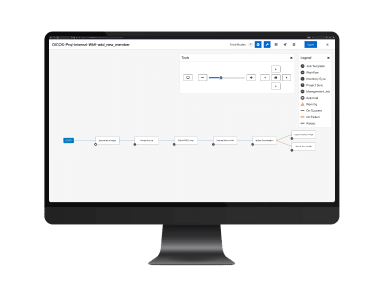
Workflow Builder Create processes simply as a sequence of individual steps. Keep control over the processes with graphical representations.
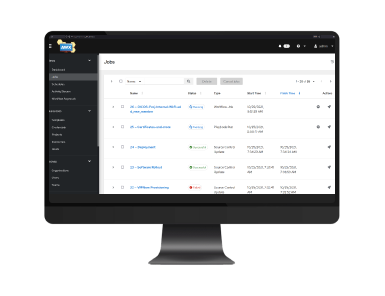
Jobs Which processes ran successfully? Where did problems occur? Just get an overview.
Integration in MS Teams With the ChatOps integration of AWX notifications in Microsoft Teams, you can see the status of your Automation jobs immediately and color-coded. The link takes you directly from Teams to the corresponding job in AWX.
SATISFIED CUSTOMERS:
Features

AWX – The Enterprise GUI for Ansible

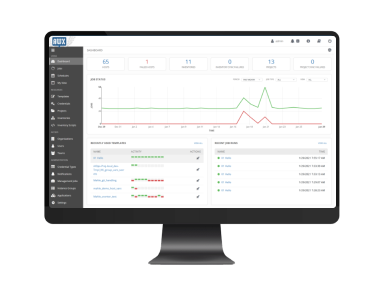
Ansible takes care of automating your processes – AWX takes care of the rest. With AWX, Ansible is complemented by important enterprise features such as reporting and security. In addition, the software collects all important information about your automations in a modern web interface.

Possibilities with the Ansible AWX BASIC SYSTEM

Cost transparency Has your investment in automation paid off? You can estimate your ROI via the number of executions and the time saved.
Large community with integrations Benefit from the knowledge of a worldwide community and the multiple integration possibilities.
Individual rights management Who is allowed to do what? With AWX you can easily set this and assign rights yourself.
Scheduling and Workflows Define graphically in which order the tasks should be processed. Then determine the desired time of the start.
Reporting All processes of your automation at a glance. The integrated dashboards provide quick insights.
REST API Easily connect other software as well as your own processes to your system.

Share expert knowledge

There are experts for every field. But they can’t take on all the tasks at the same time. With automation, you can make their knowledge available to the entire team in just a few clicks. This relieves employees and your experts can devote themselves to more important things again.

Ansible and AWX Workshop

We make our knowledge available to you in an interactive training course. This will enable your team
to master everyday automation with ease.Standard training or customized workshop. On site or remote. You decide.

INSTALLATION READY PACK

Here’s how Ansible integration works

Ansible and AWX are open source products. That means: you can use them freely. But it also means: you don't get support for installation, integration or maintenance. This is where we come in. We help you set up the software, customize it to your needs and solve the problems in daily business.

1

Requirements & sizing

We determine what your automation requirements are and what performance you need.

2

Base system installation

Our expert teams will visit you and install the basic system at your site.

3

Individualization with AWX

We connect external systems: Version Management, CMDB, Firewall, Authentication and many more.

4

Implementation of use cases

We will create and test initial use cases and show you how to reuse code.

5

Introductory training

We will show you all the functions so that you can benefit comprehensively from the software and find your way around immediately.

6

Hotline support

If something does not work, you can reach us via our hotline or by mail. Our experts will take care of it.

Use

Ansible and AWX in action

We will show you three real-world use cases that demonstrate the challenges we have been able to solve for our customers with IT automation.

Use Case # 1: Virtual machines at the touch of a button

The initial situation

The provision of virtual machines is handled by several employees and involves a great deal of manual effort. A lot of time is lost on repetitive tasks, and the manual steps leave plenty of room for error, especially in situations where staff are covering for each other.

But how can this process be fully automated while also meeting increasing security requirements and ever-shorter update cycles?

The solution

DICOS worked with the company to develop a fully integrated process that completely rethinks the provisioning of new VMs and takes into account the security requirements demanded by IT security.

The virtual machines are automatically created on the hypervisor using AWX and VMware. System hardening specifications were integrated directly into the creation process, eliminating the need for manual rework.

The focus was on the end-to-end integration of the existing infrastructure. This includes the automatic creation of CIs in the CMDB, the rollout and activation of monitoring, the maintenance of IP addresses in the IPAM system, and the management of access data in the password management system.

Technical procedure

Reservation of IP in the IPAM system
Creation of the virtual machine using a template
Entry in the CMDB
Documentation of the established CI (including responsibilities)
Securing access data in the central password manager
System Hardening
Default Configuration
Default Software
Connection to monitoring systems

The result

The provisioning time for new VMs has been reduced to just a few minutes.
The processes are standardized, error-free, and auditable.
Logging in AWX makes the process transparent and traceable.
The solution enables bulk deployment of virtual machines for the first time and provides lasting relief for the IT team.

Use Case # 2: Process automation ensures compliance on Linux hosts

The initial situation

An international technology group operated a large number of Linux hosts—spread across multiple locations, with different distributions such as RHEL, CentOS, Ubuntu, and SLES.

Due to increased security requirements and the resulting internal specifications, a way had to be found to update the machines with less effort but at a higher frequency. Due to the heterogeneity of the global landscape, there was no ‘uniform’ patch strategy, different tools and schedules for each system, manual updates, and a lack of logging in some cases, which made the operating system updates neither consistent nor traceable.

The solution

DICOS set up a global and centrally controlled patch workflow for Linux operating system updates.

The automation takes care of handling the various Linux derivatives on its own. The connection to the CMDB via dynamic inventory scripts enables end users to manage the desired time centrally.

All results of the patch processes are recorded, documented, and evaluated in a standardized manner in the ITSM system.

Technical procedure

A patch cycle is selected by the user and recorded in the CMDB.
AWX pulls a dynamic inventory from the CMDB, thereby obtaining all relevant information about a host.
AWX automatically creates schedules based on existing groups that update the systems at the desired time.
Results are logged in both AWX and the ITSM system.
User notifications can be enabled optionally.

The result

The patch process has been simplified and accelerated.
Patch cycles could be increased with less effort, and compliance requirements were met.
New systems or locations can be integrated with just a few adjustments, making the solution future-proof.

Use Case # 3: Automated rollout of security scanners on Windows hosts

The initial situation

A company’s server landscape comprises several thousand instances in different data centers and locations.

In order to perform vulnerability scans, threat detection, and compliance checks, the infrastructure must be fully covered with appropriate agents. Until now, security distribution has required a great deal of manual effort and personnel.

The IT department was therefore looking for a scalable and audit-proof solution to install security scanners on all Windows hosts across the board and keep them constantly up to date.

The result

The processes are reproducible and documented.
IT is relieved by the elimination of manual installations.
Future automation projects using the same framework are now possible.

The solution

DICOS implemented a workflow for the IT security team for Ansible and AWX. The security agents are automatically distributed and installed and connect directly to the central security platform thanks to the rolled-out configuration.

The job templates used were made available to the specialist department. Those responsible can either carry out selective updates or work with schedules.

Technical procedure

Central job control via AWX: Creation of reusable job templates for scanner rollout, integration of all Windows hosts via CMDB
Playbook execution: Communication with target systems via WinRM, checking whether the security agent is already present, downloading and installing the agent if necessary, configuration (e.g., scan server, proxy settings, logging), restarting the service
Workflow automation: Using tags and variables to control different deployment scenarios
Central monitoring & logging: Automated transfer of logs and metrics to Splunk, structured visualization of successes/failures per host, installation status and agent versions, rollout progress across regions and time, alerts for errors or failed installations

RED HAT


The Ansible Automation Platform as well as AWX are strongly supported by our business partner Red Hat. Together with the open source communities, Red Hat develops various types of software. So if you want to learn more about Ansible, Tower, and AWX, feel free to stop by Red Hat.

Integration & Development

Ansible service

Are you looking to deploy Red Hat's Ansible Automation Platform in your organization? Then you need someone to handle integration and development. We will be happy to do that for you. Just send us a message.